Queue
Short answer
The decodx Queue holds the drafts that wait for your decision. For each draft, click Approve, Revise or Skip. The agent records each decision.
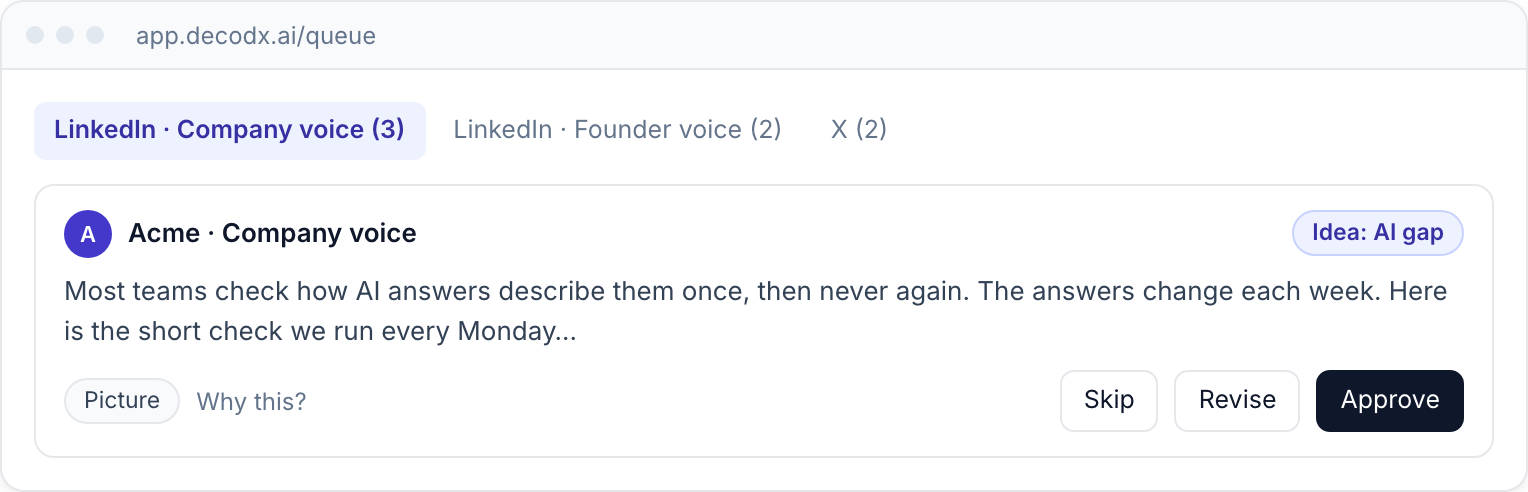
Decide on a draft
- Open Queue. Click Queue in the sidebar. The newest drafts are at the top.
- Read the draft. Read the text. Look at the visual.
- See the evidence. Click Why this? to see why the agent chose the idea.
- Decide. Click Approve, Revise or Skip.
| Action | Result |
|---|---|
| Approve | The draft is ready to post. See Post and mark posted. |
| Revise | You type what to change. The agent writes a new version. |
| Skip | The draft leaves the Queue. Type a reason. The agent uses the reason. |
tip
Type a reason when you skip a draft. The agent writes better drafts when it knows why.
note
The Queue holds a set number of drafts for each platform and voice. As of 2 Nov 2026: 3 on Free, 5 on Creator, Team and Enterprise.
Approve in Slack
Connect Slack in Integrations. decodx then sends each new draft to Slack. You can approve the draft in Slack.